

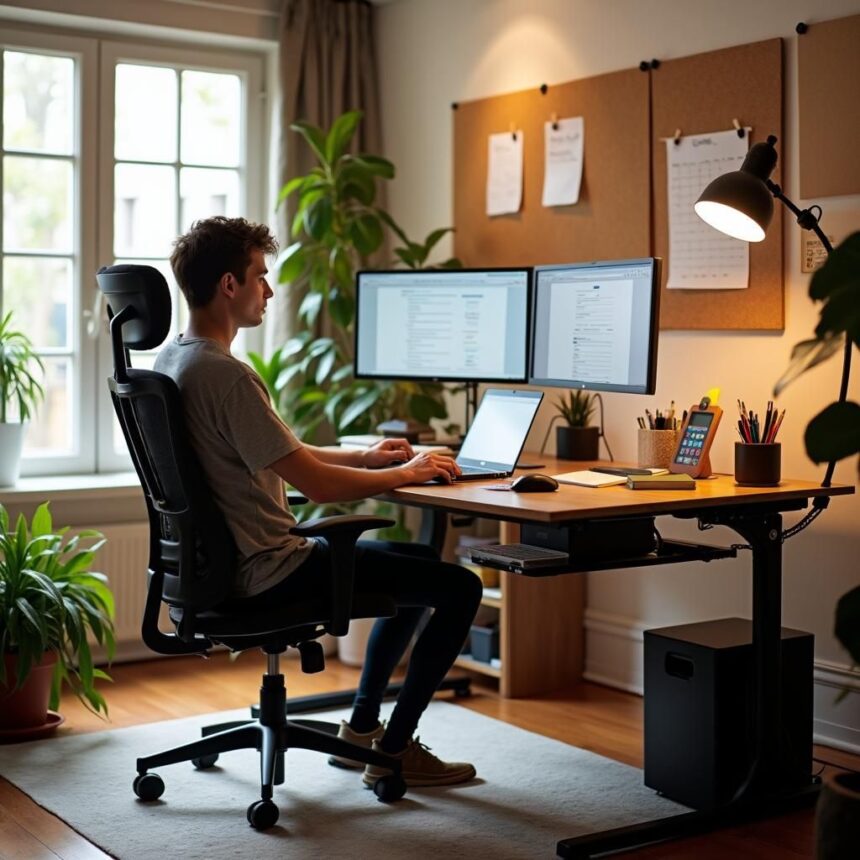
Creating a productive work-from-home environment begins with a thorough assessment of your specific needs and workspace requirements. Understanding the nature of your job is crucial; different roles demand varying levels of interaction, technology, and space arrangements. For instance, if your work necessitates frequent video conferencing, prioritizing a quiet space with good lighting and a reliable internet connection is essential. Conversely, a role focused on creative tasks might require a more flexible and inspiring setup.
Additionally, evaluating your technology needs is integral to establishing an effective workspace. This includes ensuring that your computer, software, and any necessary tools are up to date and capable of supporting your daily tasks. A reliable internet connection is also a vital component of your work-from-home setup; slow or unstable connections can hinder productivity and cause frustration. Consider investing in a high-speed internet plan and having backup options in case of connectivity issues.
Ergonomics is another significant aspect to consider while assessing your work-from-home needs. A well-thought-out ergonomic setup can prevent physical discomfort and enhance your focus and productivity. Invest in a comfortable chair that supports good posture and a desk at an appropriate height for your tasks. If space allows, consider adding accessories such as keyboard trays, monitor stands, or lap desks to further optimize your workspace.
In summary, a successful work-from-home experience hinges on understanding and addressing your unique needs regarding space, technology, and ergonomics. Taking the time to evaluate these aspects will pave the way for a more effective and enjoyable home office environment.
Choosing the Right Location
Finding the ideal location for your work-from-home setup is crucial for enhancing productivity and maintaining focus. A well-chosen workspace can significantly affect your efficiency and overall work experience. One of the first considerations should be the availability of natural light. Research suggests that exposure to natural light can improve mood and energy levels, making it imperative to select a spot in your home that offers ample sunlight. If possible, position your desk near a window, as this can create a more pleasant atmosphere.
In addition to natural light, assessing noise levels in your chosen location is essential. A quiet environment fosters concentration, enabling you to complete tasks with minimal distractions. Consider the typical noise in the area where you plan to set up your workspace. If your home is prone to interruptions, you might need to invest in soundproofing methods or headphones that help block out distractions.
Accessibility is another critical factor to keep in mind when selecting your workspace location. It should be easily reachable from common areas, especially if you have family members or roommates. However, ensure that it is somewhat secluded to maintain a professional atmosphere during your working hours. Designing a space that is separate from leisure zones can help establish a boundary, even in a shared home environment.
Lastly, it is beneficial to personalize your workspace. Incorporate elements that inspire you, such as artwork, plants, or motivational quotes. A well-decorated workspace can enhance your mood and increase productivity. Overall, carefully evaluating these aspects will enable you to choose the most suitable location within your home, creating an environment that supports your work-from-home routine effectively.
Essential Tools and Technology
Establishing an efficient work-from-home setup hinges on the selection of appropriate tools and technology that directly impact productivity. High-performing hardware is fundamental, starting with a reliable computer that caters to your work requirements. For professionals engaging in graphic design, video editing, or handling large datasets, investing in a powerful workstation or laptop with ample RAM and a fast processor is essential. Additionally, a quality monitor can significantly enhance the workspace, offering a wider display for multitasking and reducing eye strain.
Peripheral accessories also play a crucial role. A comfortable keyboard and mouse tailored to your ergonomic preferences can prevent strain during extended hours of work. Moreover, a headset with noise-canceling capabilities is indispensable for maintaining clear communication in virtual meetings, enhancing focus by minimizing distractions in potentially noisy environments.
In conjunction with hardware, the right software is equally vital for remote work efficiency. Communication platforms such as Zoom, Microsoft Teams, or Slack facilitate seamless interactions between team members, aiding quick collaboration and feedback. For project management, tools such as Trello, Asana, or Monday.com help organize tasks and maintain timelines, ensuring everyone stays aligned on project objectives.
File management tools, like Google Drive or Dropbox, allow for easy storage and sharing of important documents, fostering a collaborative atmosphere regardless of physical location. Furthermore, utilizing time-management applications like Toggl can help individuals track their productivity patterns and adjust schedules accordingly, thus improving overall time efficiency.
Incorporating these essential tools and technologies not only leads to a more organized work environment but also fosters a culture of productivity, enabling professionals to thrive in a remote setting.
Ergonomics and Comfort
Creating a productive work-from-home environment extends beyond aesthetics and organization; it is essential to prioritize ergonomics and comfort. With the increasing number of individuals engaging in remote work, the significance of maintaining physical well-being during extended hours of sitting cannot be overstated. Proper ergonomics minimizes the risk of physical strain and injury, enabling employees to work efficiently and comfortably.
The selection of an appropriate chair is one of the fundamental aspects of an ergonomic workspace. An ergonomic chair should provide adequate lumbar support, promoting a natural spine curvature. This is crucial to prevent back pain and discomfort during prolonged use. Adjustable chairs, which allow height variations and armrest positioning, can further enhance comfort, accommodating individuals of various body types to ensure a supportive fit.
Equally important is the desk setup. A desk should ideally adjust to the height of the seated user, allowing for an open posture while typing. The top of the monitor should be at or just below eye level to minimize neck strain. It is recommended to keep the screen at an arm’s length away, with the top of the screen positioned about 2 to 3 inches above eye level. Furthermore, utilizing a keyboard and mouse that promote a neutral wrist position contributes to reducing the likelihood of repetitive strain injuries.
In addition to chair and desk selections, incorporating accessories such as a footrest can improve posture by allowing feet to rest flat. Frequent breaks to stretch or reposition oneself can also significantly combat the discomfort associated with prolonged sitting. All these adjustments work synergistically to support the comfort and health of individuals working from home, thus enhancing productivity and overall job satisfaction.
Creating a Distraction-Free Environment
Establishing a productive work-from-home setup significantly hinges on creating a distraction-free environment. Since working from home often leads to overlapping personal and professional spaces, implementing strategies to minimize distractions is vital for maintaining focus. Firstly, it is essential to set clear boundaries with family members or housemates. Communicating your working hours and the importance of uninterrupted time can help reduce disturbances. Consider using visual cues, such as a ‘do not disturb’ sign, to reinforce your focus period.
Another crucial aspect of minimizing distractions involves managing household tasks effectively. One common pitfall for remote workers is the temptation to engage in household chores during work hours. To combat this, schedule specific times for tasks, such as cleaning or meal preparation, to ensure that these activities do not encroach upon your work schedule. Organizing a task list and setting priorities can assist in balancing household responsibilities with work commitments.
Furthermore, the use of technology can be instrumental in creating a distraction-free workspace. Various applications are designed to block notifications from social media or other distracting websites during work hours, thereby allowing you to concentrate fully on tasks. Utilizing tools like noise-cancelling headphones or ambient sound generators can also help drown out background noise, enhancing your focus. Additionally, arranging your workspace ergonomically, ensuring that all necessary supplies are within reach, can reduce the likelihood of getting up frequently, which may lead to distractions.
Setting a Routine and Boundaries
Establishing a consistent daily routine is vital for fostering productivity in a work-from-home environment. A well-structured schedule helps to create a sense of normalcy and can lead to improved focus and efficiency during working hours. Begin by determining your most productive times of the day. For some, mornings prove to be the most effective, while others may find they achieve better results in the afternoon or evening. Once you identify your peak productivity periods, allocate your most important tasks to these times, ensuring they receive the attention they deserve.
In addition to pinpointing productive hours, it is crucial to delineate specific work hours. Set start and end times for your workday that are strictly adhered to, as this sets a clear boundary between professional and personal time. Communicate these boundaries to your household, clearly articulating when you are available and when you need undisturbed focus. This not only helps you maintain concentration on work tasks but also aids family members and housemates in respecting your work schedule, thereby minimizing interruptions.
Moreover, incorporate breaks into your routine. Short breaks can significantly enhance concentration and overall performance by preventing burnout. Use these moments to step away from your workspace, stretch, or engage in a brief leisurely activity. This practice promotes mental clarity and allows for better transition between work and personal life.
A well-established routine that incorporates boundaries facilitates a healthier work-life balance, essential for reducing stress associated with remote work. This balance will ultimately lead to improved job satisfaction and, consequently, better productivity as you transition seamlessly between your professional responsibilities and personal time.
Adding Personal Touches
Creating an effective work-from-home setup goes beyond ergonomic furniture and high-speed internet; it involves fostering an environment that resonates on a personal level. Personal touches in your workspace can significantly enhance motivation, creativity, and overall productivity. This emotional connection to your workspace can help eliminate the often isolating feeling that remote work entails.
One way to personalize your setup is by incorporating decor that reflects your personality. This can include artwork, photographs, or items that inspire you. Consider displaying a vision board or inspiring quotes that resonate with your professional goals. These visual elements serve not only as decoration but also as daily reminders of your aspirations, making your workspace a hub of inspiration.
Another excellent addition to your home office is live plants. Plants are known to improve air quality and create a calming atmosphere, which can enhance productivity. Choose low-maintenance options such as succulents or pothos if you are concerned about upkeep. The presence of greenery can make your workspace feel more vibrant and alive, positively impacting your mood throughout the day.
Additionally, consider integrating elements that stimulate your creativity. This could involve a dedicated area for arts and crafts or a simple notebook for jotting down ideas that come to mind during the workday. A creative outlet can break the monotony of routine tasks and provide a refreshing mental reset.
Ultimately, the goal of adding personal touches to your work-from-home setup is to create a space that feels uniquely yours, promoting a positive and motivating work environment. A room that reflects your personality can not only help you feel more comfortable but also encourage a healthier work-life balance, reinforcing the emotional connection to your professional endeavors.
Regularly Reviewing and Adjusting the Setup
Creating an effective work-from-home environment is not a one-time task; it requires regular evaluation and adaptation to respond to evolving demands and preferences. Periodic reassessment of your workspace plays a pivotal role in sustaining productivity. Over time, it is natural for your needs and work habits to change. Changes in job responsibilities, personal circumstances, or even advancements in technology can necessitate adjustments to your workspace.
One of the first steps in this process is to conduct a self-assessment of your current setup. Consider the following factors: is your workspace ergonomic? Are the tools and resources you rely on meeting your current needs? Taking the time to analyze these aspects will provide insight into necessary changes. Utilizing tools such as feedback from colleagues or even personal reflections can inform this review.
In addition to self-assessment, it’s advisable to remain flexible and open-minded regarding new concepts or tools that could enhance your setup. For example, exploring adjustable desks, modern organizational tools, or innovative technology could drastically impact your productivity. Incorporating feedback from your home life can also be beneficial. For instance, involving family members or roommates might shed light on potential disturbances that can be easily mitigated with minor adjustments.
Furthermore, consider the aesthetics of your workspace. The visual appeal and overall ambience of your working environment can significantly influence motivation levels. Regularly changing decor elements or investing in inspiring art can create a refreshing atmosphere that revitalizes your daily routine.
Ultimately, by routinely evaluating and adjusting your setup, you ensure it continues to facilitate focus and productivity. Such diligence empowers you to cultivate a work-from-home experience that aligns with your growth and satisfaction, resulting in sustained success over the long term.
Maintaining Work-Life Balance
In the era of remote work, establishing a clear work-life balance is paramount for promoting overall well-being. The absence of a physical separation between work and home can lead to extended working hours, contributing to burnout and diminished productivity. Therefore, implementing proactive strategies to delineate personal time from professional obligations is crucial.
One effective technique is to set defined working hours. By adhering to a schedule, employees can create a routine that mimics the traditional office environment, ensuring that work does not encroach upon personal time. It is essential to communicate these boundaries to colleagues and family members, establishing expectations around availability.
In conjunction with setting a schedule, regular breaks throughout the workday can contribute significantly to maintaining focus and energy levels. The Pomodoro Technique, which involves 25 minutes of focused work followed by a 5-minute break, is one approach that can enhance productivity while allowing for necessary mental resets. During these breaks, engaging in physical movement or brief mindfulness exercises can further improve well-being.
Additionally, after working hours, it is beneficial to consciously disengage from work-related tasks. This may involve turning off email notifications, logging out of work accounts, or designating a specific area in the home that is work-free. By creating rituals to signal the end of the workday, individuals can better transition into personal time.
Lastly, self-care should be prioritized within the context of remote work. Activities such as exercise, hobbies, and socializing play a significant role in restoring balance. Investing time in activities that promote relaxation and enjoyment can help mitigate the stresses associated with working from home and contribute to a more productive work-life integration.